
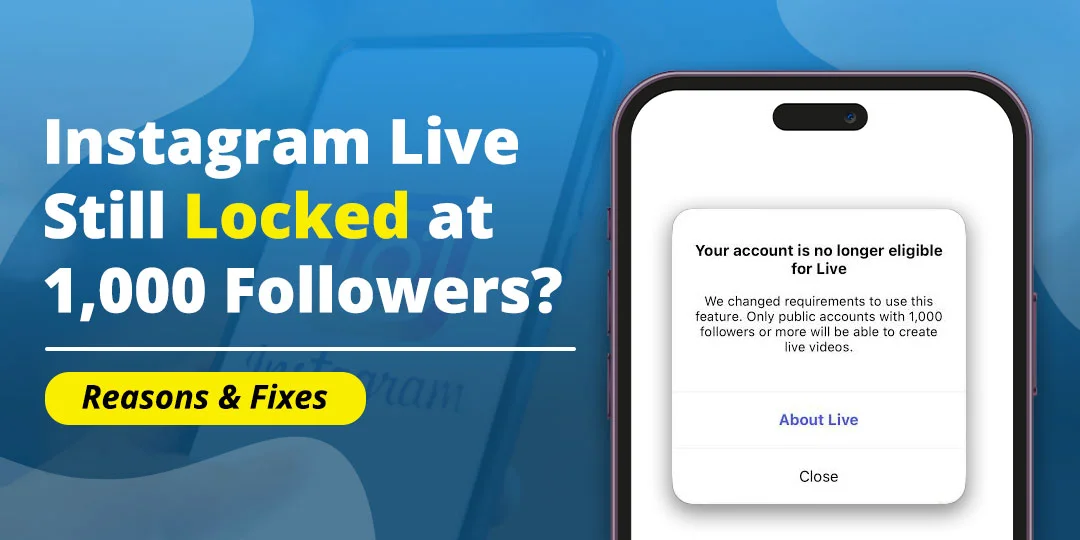
If Instagram Live is still locked after your account reaches 1,000 followers, check more than the follower count. Instagram’s current Help Center says that only public accounts with at least 1,000 followers can start a Live video.
That means a professional account can reach 1,000 followers and still remain unable to stream if it is private, has an account restriction, is affected by Teen Account controls, or is experiencing a feature or app problem.
This guide explains why Instagram Live remains locked, what to do when the camera slider does not show Live, how to check a Community Guidelines restriction, and how to appeal when the feature was disabled incorrectly.
Contents
Key Takeaways
If Instagram Live is locked after reaching 1,000 followers, check these items first:
- The account is public, not private.
- The account really has 1,000 or more followers.
- The account is not a Teen Account blocked by age-based controls.
- Account Status does not show a Live restriction.
- The Instagram app is updated.
- Live is not missing because of a camera-screen or account rollout problem.
If all six checks are clear, report the missing Live option through Instagram’s in-app support and include screenshots of the follower count, public profile, and Account Status.
Instagram’s 1,000-Follower Rule
Instagram’s official Live help page states that only users with a public account and 1,000 followers or more can start a Live broadcast.
Both conditions matter. Reaching 1,000 followers is not enough if the account remains private. Likewise, making the account public will not unlock Live if the follower count is below 1,000.
Check the profile before troubleshooting the app:
- Open Instagram and go to your profile.
- Tap Edit profile or the menu button.
- Open Account privacy.
- Confirm that Private account is turned off.
- Return to the profile and confirm the follower count.
- Close and reopen Instagram.
Instagram may take some time to update eligibility after a privacy change or rapid follower change. Do not repeatedly switch between public and private while waiting.
Why Live Is Still Locked
A 1,000-follower public account can still lose or lack Live access for account-level reasons.
1. The account is private
This is the most common explanation after reaching the follower threshold. The profile must be public for Instagram Live under the current rule.
2. A Live restriction is active
Instagram may disable Live after a Community Guidelines, copyright, or safety-related decision. The restriction can affect Live without disabling the entire account.
3. The account is a Teen Account
Teen Accounts have additional protections. Instagram says users under 16 need a parent or guardian’s permission for less-protective settings, including Live access.
If the account is a supervised teen account, reaching 1,000 followers does not remove the age-based control. Our guide on Instagram Live not showing on a teen account explains how parental approval and Teen Account restrictions affect Live.
4. Instagram has not refreshed the account
A recent change in follower count, account privacy, age status, or supervision may not appear immediately in the Live tool. The dashboard and camera screen can temporarily show different information.
5. The Live feature is missing from the app interface
Instagram sometimes places Live inside the Stories camera or the Create screen. A missing bottom slider does not always mean the account is blocked.
6. A device or app problem is hiding the option
An outdated app, beta build, damaged cache, network filtering, or incomplete app update can prevent the Live mode from loading.
Check Account Status
Account Status is the most useful place to check for an Instagram Live restriction.
- Open Instagram and go to your profile.
- Tap the menu button.
- Open Settings and activity.
- Search for Account Status.
- Review removed content, disabled features, and recommendation issues.
- Open any Live-related notice.
- Select Request a review if Instagram provides the option.
Instagram says repeated Community Guidelines violations can lead to loss of account access or other restrictions.
A clean Account Status does not guarantee that Live will appear, but a Live-specific warning explains why reaching 1,000 followers did not unlock it.
Instagram Live Disabled Due to Community Guidelines
If Instagram disabled Live because of a Community Guidelines decision, the penalty length depends on the reason, account history, and notice shown in Account Status. Instagram does not publish one universal Live-penalty duration for every violation.
The restriction may be temporary, but it can last longer when:
- The same type of violation happens repeatedly.
- The content involves safety, harassment, threats, or regulated activity.
- Instagram detects repeated attempts to bypass restrictions.
- The account has unresolved copyright or intellectual-property complaints.
- The account receives several warnings in a short period.
Do not rely on claims that every Live suspension lasts exactly 24 hours, 7 days, or 30 days. Check the date or review option in the notice connected to your account.
How to appeal a Live restriction
- Open Account Status.
- Select the Live or content decision.
- Read the reason for the restriction.
- Tap Request a review or Appeal.
- Explain briefly why the decision may be incorrect.
- Submit the request once.
- Save the confirmation.
Instagram says some content decisions can take up to 90 days to review, although the time can vary.
Do not delete the account or create a second account to avoid the restriction. A new account may receive the same eligibility limits, and repeated evasion attempts can make review more difficult.
Instagram Camera Bottom Slider Missing Live Option Completely
If the Live mode is completely missing from the camera’s bottom slider, check both locations where Instagram may place creation tools.
1. Check the Stories camera
- Open Instagram.
- Tap your profile picture or swipe right from the Feed.
- Swipe across the camera modes at the bottom.
- Look for Live.
- If it is not visible, continue to the Create screen.
2. Check the Create screen
- Return to the Feed.
- Tap the + button.
- Swipe through the available creation modes.
- Check whether Live appears there.
Instagram’s interface can change between app versions. A current troubleshooting guide also recommends checking both the Stories camera and Create screen, testing another account, and comparing another device.
Fix 1: Confirm the Account Is Public
Reaching 1,000 followers does not unlock Live while the account is private.
- Open your Instagram profile.
- Tap the menu button.
- Open Settings and activity.
- Search for Account privacy.
- Turn off Private account, if it is enabled.
- Confirm the change.
- Wait briefly, then restart Instagram.
If you do not want a public profile, Instagram’s current rule may prevent you from starting a Live. There is no reliable setting that allows a private account to bypass the public-account requirement.
Fix 2: Confirm the Follower Count
Check the visible follower count on your profile and make sure it is at least 1,000. Recent unfollows, removed accounts, spam-account cleanups, or delayed statistics can change the number.
Do not buy followers to reach the threshold. Purchased or inauthentic followers may disappear and can create account-quality or policy problems.
If your profile shows 1,000 followers but Instagram still says you are below the requirement, capture a screenshot and report the mismatch through Help > Report a problem.
Fix 3: Check Whether the Account Is Supervised
If the user is under 18, check whether the account is an Instagram Teen Account or linked to parental supervision. Under-16 users need parent or guardian approval for Live, so the follower count alone cannot unlock the feature.
A parent and teen may need to review the Live setting in Family Center or Instagram supervision. Do not change the birthday to bypass the control.
Fix 4: Update and Restart Instagram
If Account Status is clear and the profile is public with 1,000 followers, refresh the app:
- Update Instagram through the App Store or Google Play.
- Force-close Instagram.
- Restart the phone.
- Open both the Stories camera and Create screen.
- Switch between Wi-Fi and mobile data.
- Sign out and back in only if you know the correct login details.
On Android, clearing Instagram’s cache may help. On iPhone, offloading or reinstalling the app can refresh damaged app files. Save drafts and confirm account access before deleting the app.
Fix 5: Check Camera and Microphone Permissions
Permissions usually affect the ability to start a Live rather than the account-level eligibility switch, but they are still worth checking.
1. iPhone
- Open Settings.
- Scroll to Instagram.
- Turn on Camera and Microphone.
- Reopen Instagram.
2. Android
- Open Settings.
- Tap Apps.
- Select Instagram.
- Open Permissions.
- Allow Camera and Microphone.
- Reopen Instagram.
If Live is absent on every device, permissions are probably not the main cause. Focus on Account Status, privacy, age, and eligibility.
Fix 6: Test Another Account or Device
A comparison test helps separate an account problem from a phone problem.
- Log into another eligible public account on the same phone.
- Check whether Live appears.
- Log into your account on another trusted phone.
- Check the Stories camera and Create screen.
If Live appears for another account on your phone, the device is probably working and your account needs review. If Live is missing only on your phone, update or reinstall Instagram after protecting drafts and login access.
Fix 7: Report the Missing Live Option
Use Instagram’s in-app report when the account appears eligible but the Live option is missing.
- Open Profile.
- Tap the menu button.
- Select Help.
- Tap Report a problem.
- Choose the option to report without shaking, if shown.
- Explain that the account is public, has at least 1,000 followers, and has no relevant Account Status restriction.
- Attach screenshots.
Include:
- Username.
- Country.
- Account type.
- Follower count.
- Public or private status.
- The exact message shown.
- Whether Live is missing from both the camera and Create screen.
- Phone model and app version.
Do not include your password, verification code, or private messages.
Professional Account Reached 1,000 Followers but Live Is Still Locked
A professional Creator or Business account can still be locked out of Live. Professional status helps access creator tools, but it does not override Instagram’s public-account, follower, age, or policy requirements.
Check the following in order:
- Confirm the profile is public.
- Confirm the follower count is still at least 1,000.
- Check Account Status.
- Check whether the account is supervised or under a Teen Account.
- Look for a Live-specific notice.
- Update Instagram.
- Test another device.
- Report the account-specific mismatch.
If you are trying to use Live Badges rather than simply start a Live, that is a separate monetization feature. You can know about Instagram Live Badges greyed out where we explains why Badges can remain unavailable even when Live access is available.
Why Account Age and Follower Count May Not Be Enough
Instagram does not treat follower count as the only eligibility signal. A large account can still be restricted because of:
- A private profile.
- Teen Account controls.
- Community Guidelines decisions.
- Copyright or intellectual-property complaints.
- Unusual activity or security restrictions.
- A location or feature rollout issue.
- An account that has not synchronized a recent change.
Avoid unofficial claims that an account must be 30 days old or have a specific number of posts unless Instagram shows that requirement in your own notice. The official Live page confirms the public-account and 1,000-follower conditions, while account-specific restrictions appear in Account Status.
Instagram Live and TikTok Live Are Not the Same
Instagram and TikTok use different Live eligibility and safety systems. A follower threshold or age rule on one platform does not automatically apply to the other.
If you are deciding which app to use for livestreaming, you can go through the guide on Instagram vs TikTok compares their features and safety controls.
What Not to Do
You must avoid these actions while trying to unlock Instagram Live:
- Do not buy followers.
- Do not change the birthday to bypass Teen Account restrictions.
- Do not repeatedly switch between public and private.
- Do not create a second account to evade a restriction.
- Do not use modified Instagram apps.
- Do not pay a third party that promises to restore Live.
- Do not submit repeated appeals with conflicting explanations.
- Do not share your password or security code.
Frequently Asked Questions
Why is Instagram Live still locked after reaching 1,000 followers?
The account may be private, restricted, supervised under a Teen Account, affected by a delayed eligibility update, or experiencing an app problem. Instagram requires a public account and at least 1,000 followers to start Live.
Does a professional account automatically unlock Instagram Live?
No. A Creator or Business account can access professional tools, but Live still depends on the public-account, follower, age, policy, and account-status requirements.
Why is the Instagram Live option missing from the camera slider?
It may be located in another camera mode, hidden by an account restriction, unavailable because the account is private or below 1,000 followers, or not loading because of an app issue. Check both the Stories camera and Create screen.
How do I fix Instagram Live disabled due to Community Guidelines?
Open Account Status, read the Live-related decision, and select Request a review or Appeal if available. The restriction length varies by violation and account history; Instagram does not publish one universal penalty duration.
How long does an Instagram Live penalty last?
There is no single duration for every restriction. Check the notice in Account Status for the applicable date or review option. Some content decisions may take up to 90 days to review.
Can a private account go Live with 1,000 followers?
Instagram’s current Help Center says only public accounts with at least 1,000 followers can start a Live. A private account does not meet that requirement.
Can Teen Account controls block Instagram Live?
Yes. Instagram says users under 16 need parent or guardian permission for less-protective settings, including Live.
Why is Live missing on my iPhone but available on another account?
If another account shows Live on the same iPhone, the issue is likely related to your account’s eligibility, restriction, or rollout rather than the device. Check Account Status and report the mismatch.
Do Instagram Live Badges unlock Live access?
No. Live Badges are a separate monetization feature. An account may be able to stream without Badges, or it may meet Badges requirements while Live itself is restricted.
Conclusion
If Instagram Live is still locked after reaching 1,000 followers, confirm both parts of Instagram’s current requirement: the account must be public and have at least 1,000 followers.
Then check Account Status, Teen Account supervision, the Live restriction notice, the Stories camera, the Create screen, and the app installation. If the account is clearly eligible but Live is missing everywhere, submit a detailed in-app report with screenshots.
Do not buy followers, change your age, or use unofficial tools to bypass the restriction. The safest solution is to correct the account setting, appeal a genuine mistake, or wait for Instagram to complete its review.
Disclaimer: Primotechy is an independent website and is not affiliated with or endorsed by Meta Platforms, Inc. or Instagram.
Sources
- Live – Instagram Help Center
- About Teen Accounts – Instagram Help Center
- Check Your Account Status on Instagram
- What to Do If You Do Not Think Instagram Should Have Taken Down Your Content
- About Disabled Instagram Accounts
Editorial note: Instagram’s Live eligibility, age controls, interface, review periods, and account-specific restrictions can change. The notice shown in your Instagram Account Status and Live screen is the most reliable source for your account.
Anica Lymus is a technical writer specializing in consumer applications, mobile operating systems, and practical troubleshooting workflows. At Primotechy, she covers account security, software glitches, and app performance across platforms such as Facebook, Instagram, and Snapchat. Drawing on hands-on device testing and in-depth research across iOS, Android, macOS, and Windows, Anica translates complex platform settings and sudden technical errors into clear, verified, step-by-step guides that readers can easily follow and trust.
View all posts by Anica Lymus →