
Snapchat error SS06 means Snapchat has banned the device you are using, not just your account. Clearing the cache, reinstalling the app, or changing your password will not remove it.
Your realistic option is to use your account on a different device you own. If Snapchat shows an Appeal Decision option, use it, but it may apply to an account lock rather than the SS06 device ban.
This guide explains what SS06 really means, how it differs from other login errors, and which steps are worth your time. It also covers what to avoid, because a lot of “100% working” fixes online do not hold up.
Contents
Quick Overview
- What it is: A device-level ban. Snapchat says SS06 and SS18 both point to abuse or repeated Community Guidelines violations on that device.
- What does not work: Reinstalling, restarting, clearing cache, or changing your password.
- What may work: Logging in on a different device. If Snapchat shows an Appeal Decision option, use it, but it may apply to an account lock rather than the device ban.
- What Support can do: Snapchat states that Support cannot unban a banned device.
- Biggest risk: “Unban” services and password-sharing scams.
What Does SS06 Mean on Snapchat?
SS06 is a support code shown at login that means the phone or tablet itself is blocked from Snapchat. According to Snapchat’s Help Center, SS06 and SS18 both mean the device was banned due to abuse or repeated violations of the Community Guidelines.
The key word is device. The block is tied to the hardware you are holding. That is why a new login attempt, even with a different account, can show the same warning on that phone.
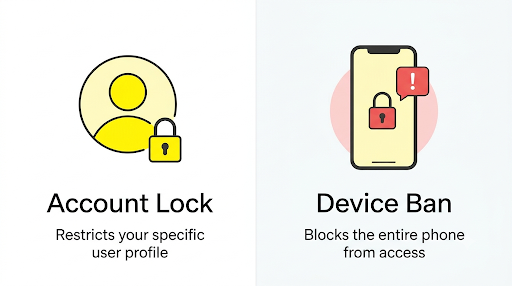
Snapchat’s own help article says that if your device has been banned, Snapchat Support cannot unban it for you. That one line explains why so many support tickets about SS06 go nowhere.
Why Does Snapchat Show Error SS06?
Snapchat shows SS06 when its systems flag a device for abuse or repeated rule violations. Snapchat does not publish the exact triggers, so anyone who gives you a precise list is guessing.
Based on Snapchat’s wording and what users report, these are the most likely situations:
- Rule violations tied to your own activity. Repeated Community Guidelines issues on accounts used from that phone.
- A second-hand phone. Several users report seeing SS06 right after buying a used phone, which suggests the previous owner’s activity may be the cause.
- A mistaken flag. Automated systems can get it wrong. Users with no known violations report this, though Snapchat does not confirm how often it happens.
You will also see articles blaming VPNs, outdated apps, server glitches, or a corrupted cache. Those can cause other Snapchat login problems. They are not what Snapchat describes for SS06.
How Is SS06 Different From Other Snapchat Login Errors?
SS06 is a device ban, while several similar-looking codes mean something else. Check the exact code before you try any fix, because the right move depends on it.
| Error code | What Snapchat says it means | What to do |
| SS06 or SS18 | Device banned for abuse or repeated violations | Try another device, then appeal if the option appears |
| SS07 | Device banned because too many accounts were linked to it | Use another device. Do not keep creating accounts on this one |
| SS02 | Temporary ban on that device after repeated failed login attempts | Stop retrying and try again later |
| SS10 | Device does not meet Snapchat’s integrity requirements | Log in from a different device |
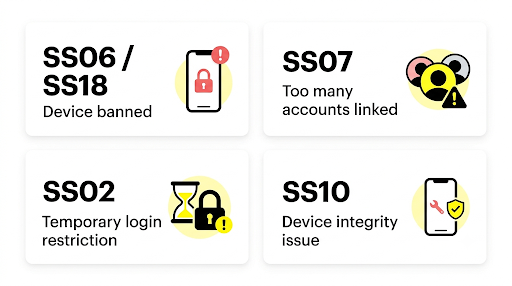
One more thing to separate. A message saying your account is locked is different from a device ban. A locked account can sometimes be appealed from the login screen. A device ban is much harder to reverse.
Is Snapchat SS06 a Permanent Ban?
Snapchat’s help article does not describe an expiry date for SS06, and users report waiting months with no change. Treat it as long-term unless Snapchat tells you otherwise.
Some blogs call SS06 “temporary” and tell you to wait 24 to 48 hours. That timing applies to temporary account locks, not to a device ban. If you see SS06 and nothing changes after a few days, waiting is not likely to be the fix.
What Should You Do When You See SS06?
Start with the steps that cost nothing and carry no risk. Work through them in order.
- Confirm the code. Take a screenshot of the full error screen. Make sure it says SS06, not SS02 or SS10, since those have different fixes.
- Try your account on a different device you own. Because the ban sits on the device, reports show accounts can often still be used elsewhere. This is not guaranteed. If the account itself is locked, it will not open on any phone.
- Look for an appeal option. Try logging in again and see whether the pop-up shows an Appeal Decision button. If it does, use it (details in the appeal section below).
- Contact Snapchat Support once. On the Snapchat Support site, open a new request, choose I can’t access my account, then I see an error message when I log in. Give the exact code, your username, and the device model. Expect a limited result, since Support says it cannot lift device bans.
- Stop testing the banned device. Repeated login attempts, new accounts, and app reinstalls on that phone do not help and can make a messy situation worse.
How Do You Fix SS06 on iPhone and Android?
The process is the same on both. SS06 is Snapchat’s decision about the device, so Apple and Google cannot remove it.
On iPhone
Apple Support Community moderators repeat the same point in many threads: Apple did not ban the phone and cannot unban it. Updating iOS or deleting and reinstalling Snapchat is not expected to clear a device ban. If you want to use Snapchat on an iPhone, the practical route is a different iPhone or iPad.
On Android
The same rule applies. Clearing app storage or uninstalling Snapchat resets the app, not Snapchat’s record of the device. Switching to another Android phone is the most direct route if your account itself is in good standing.
What if you bought a second-hand phone?
This is one of the most common real-world cases. If SS06 appeared right after you bought a used device, you may have inherited a ban from the previous owner. Ask the seller whether they had Snapchat trouble. Then use the appeal route and say clearly that the phone is second-hand and you did not use it before. Snapchat may not reverse it, but a clear explanation is your only real argument.
How Do You Appeal a Snapchat SS06 Ban?
Snapchat’s in-app appeal process is for an eligible account lock, not a confirmed device ban. If you see an Appeal Decision option while trying to log in, use it, but it may relate to a lock on your Snapchat account rather than the SS06 device ban itself.
- Open Snapchat and try to log in as usual.
- If the pop-up shows Appeal Decision, tap it.
- Follow the on-screen prompts and explain what happened in plain, honest language.
- Wait for the reply by email and check your spam folder.
If you do not see Appeal Decision, your account lock is not eligible for appeal. Snapchat still says Support cannot unban a banned device. Do not try to open tickets elsewhere to work around that.
Treat your appeal as a single attempt. Reports differ on whether a second try is allowed, so write the first one well. Include your username, the device model, and any facts that support your case, such as buying the phone used. Do not send repeated messages.
What Should You Avoid When You Get SS06?
- “Unban” services and hacks. Anyone selling a guaranteed fix is either guessing or running a scam. Never share your Snapchat password or verification codes.
- Creating new accounts on the banned device. The device is already blocked, so new accounts there can show the same warning.
- Hiding the device with tricks. Workarounds meant to mask a banned device may break Snapchat’s rules and put your other devices at risk.
- Rapid retries. Many failed logins can trigger a different restriction on top of the one you already have.
What Can You Do If You Cannot Get Back In?
Protect what you can before moving on. If your account still opens on another device, save your photos and videos first. If it does not, you may still be able to request your Snapchat data from a computer. Our guide on downloading Snapchat Memories when the email link does not work explains how to check for a completed export and save your photos and videos.
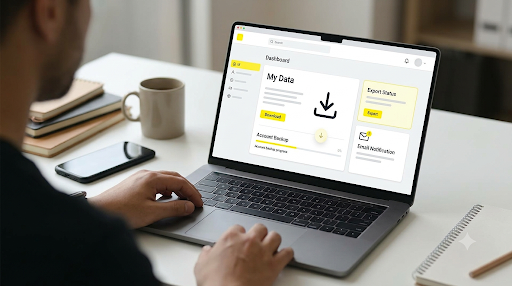
You can also request your Snapchat data from a computer. Go to accounts.snapchat.com, sign in, open My Data, choose the data you want, confirm the email address where you want to be notified, and click Submit. Snapchat will email you a download link when your data is ready.
If you end up starting fresh on a new device, you may need to rebuild your friend list. Our tips for finding someone on Snapchat without their username can help you reconnect with friends faster.
Frequently Asked Questions
Will SS06 follow me to a new phone?
Not usually, because the ban is attached to the device. Your account may open normally on a new phone. The exception is a locked account, which stays locked everywhere. Some users report still seeing a ban after switching phones, so treat a new device as likely to work, not guaranteed.
Does changing my password remove SS06?
No. A password change protects your account. It does not change Snapchat’s decision about the device. Change it only if you think someone else has accessed your account.
Can I log in with a different account on the banned phone?
Probably not. Users report seeing the same device-banned warning even when they try another account on that phone. This is a good reason to stop testing it.
Why do I see SS06 on a phone I just bought?
A used phone may carry a ban from its earlier owner. If you bought it new and sealed, contact the retailer and Snapchat. Explain the situation in your appeal, since a mistaken flag is possible.
Does SS06 affect all my Snapchat accounts?
It affects Snapchat use on that device. Accounts are not necessarily banned, but you cannot use them on the blocked phone. Try each account on a different device to find out.
Final Recommendation
Do three things, in this order. First, confirm the error is really SS06. Second, try your account on a different device you own. Third, if the Appeal Decision option appears, submit one clear and honest appeal.
If none of that works, accept that the banned device may be unusable for Snapchat and avoid anyone promising a quick unban. Save your Memories if you still have access, and keep your account details private while you wait.

Anica Lymus is a technical writer specializing in consumer applications, mobile operating systems, and practical troubleshooting workflows. At Primotechy, she covers account security, software glitches, and app performance across platforms such as Facebook, Instagram, and Snapchat. Drawing on hands-on device testing and in-depth research across iOS, Android, macOS, and Windows, Anica translates complex platform settings and sudden technical errors into clear, verified, step-by-step guides that readers can easily follow and trust.
View all posts by Anica Lymus →