
If your TikTok playlist is not showing on your profile, the cause is usually one of three things: your account doesn’t have the playlist feature yet, the playlist has no public videos, or the app is glitching. A private account will also hide every playlist from other people, even if you can still see them yourself.
The good news is that most of these problems take a few minutes to check. Below, you’ll find out which cause applies to you, how to fix it, and what to do if playlists vanished from someone else’s profile instead of your own.
Contents
Quick Overview
| What You See | Most Likely Cause | Quick Fix |
| No “Sort videos into playlists” or “Manage playlists” option at all | Playlist feature not available on your account yet | Check TikTok Studio, keep growing, or contact TikTok support |
| You see your playlist, but followers don’t | Private account or no public videos in the playlist | Switch to public and add at least one public video |
| Playlist was there yesterday and is gone today | App bug, outdated version, or corrupted cache | Update the app, clear cache, log out and back in |
| You can’t see playlists on any creator’s profile | App glitch or server-side issue | Clear cache, re-login, or wait for TikTok to fix it |
| Playlist screen says “No internet connection” | Loading bug on TikTok’s end | Switch networks, update the app, then check later |
Why Is My TikTok Playlist Not Showing on My Profile?
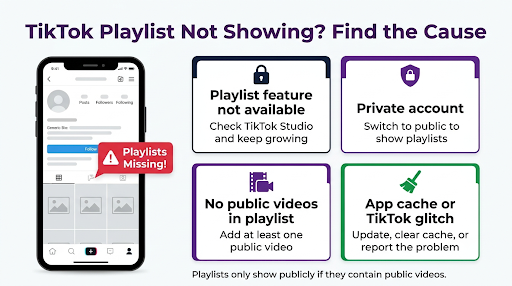
Your TikTok playlist is usually missing because of eligibility, visibility settings, or a technical glitch. Each one needs a different fix, so it helps to figure out which one you’re dealing with first.
1. Your Account Doesn’t Have Playlists Yet
TikTok says plainly in its official help page on creator playlists that playlists aren’t currently available to everyone. If you don’t see an option to create playlists in the posts tab on your profile, the feature simply hasn’t been turned on for your account.
Most guides and creators report that the feature tends to appear after an account passes around 10,000 followers. TikTok itself doesn’t publish a fixed follower number, though. Some smaller accounts have it, and some larger accounts don’t. So treat 10K as a common pattern, not a guaranteed rule.
2. Your Account Is Private
When you switch to a private account, you can still create and manage playlists, but nobody else on TikTok can see them. This is the number one reason people say “I can see my playlist, but my friends can’t.”
3. The Playlist Has No Public Videos
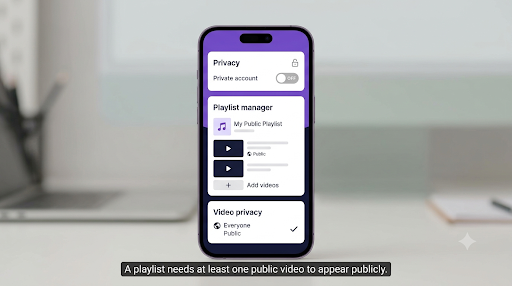
Playlists are built from your posted videos. If every video in a playlist is set to Friends or Only You, or you deleted the videos inside it, the playlist has nothing public to show. Viewers won’t see it on your profile.
4. The App Is Outdated or the Cache Is Corrupted
Old app versions and messy cache files can stop the playlist row from loading. This often shows up as playlists that disappear suddenly, load as a blank space, or show a “No internet connection” message even when your Wi-Fi works fine.
5. Your Account Type Is Affecting Features
Some users report that switching between Personal and Business accounts changes which creator tools they can access. Business accounts also have a more limited music library. If your playlists went missing right after you changed account types, that change is worth looking at.
6. TikTok Is Having a Wider Problem
Sometimes the issue isn’t you at all. Several times, large groups of users have reported that they couldn’t open any creator’s playlists for days, while the rest of the app worked normally. In those cases, the fix usually comes from TikTok’s side.
Pro Tip! Before you change any settings, open a big creator’s profile that you know uses playlists. If their playlists are missing too, it’s an app or server issue. If theirs load fine but yours don’t, the problem is tied to your account or settings.
How Do You Check If You Have the TikTok Playlist Feature?
You can check for the playlist feature in two places: the posts tab on your profile and TikTok Studio. If neither shows a playlist option, your account doesn’t have access yet.
- Open the TikTok app and tap Profile at the bottom.
- Look at the posts tab, just above your video grid. If you have access, you’ll see Sort videos into playlists (before your first playlist) or a Manage playlists button (after you’ve made one).
- If you don’t see it, tap the Menu (☰) icon at the top right and open TikTok Studio.
- Look through the tools section, which may be labeled More tools, for a Playlist option.
Menu names can shift slightly between app versions and between iPhone and Android. If a label looks different, look for the closest match.
How Do You Fix a TikTok Playlist Not Showing on Your Profile?
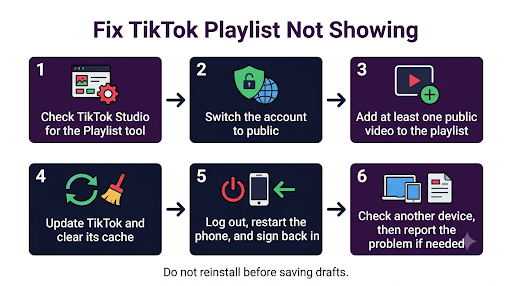
Start with the quick checks and move to the bigger fixes only if needed. Work through these in order.
Step 1: Make Your Account Public
- Go to Profile and tap the Menu (☰) icon.
- Tap Settings and privacy, then Privacy.
- Turn off Private account.
Once your account is public, playlists that contain public videos become visible to other people again.
Step 2: Add at Least One Public Video to the Playlist
- On your profile, tap Manage playlists in the posts tab.
- Open the playlist that isn’t showing.
- Add a video that is set to Everyone.
You can also add a video from the video itself. Open the video, tap the More (…) or share options, and choose Add to playlist. If any videos in the playlist are set to Friends or Only You, change their privacy to Everyone if you want viewers to see them.
Step 3: Update the TikTok App
Open the App Store on iPhone or the Google Play Store on Android, search for TikTok, and tap Update if it’s available. Many playlist bugs get patched quietly in new versions.
Step 4: Clear TikTok’s Cache
Clearing the cache is the fix most users report working, especially when playlists disappear overnight.
- Go to Profile and tap the Menu (☰) icon.
- Tap Settings and privacy.
- Scroll down and tap Free up space.
- Tap Clear next to Cache.
This works on both iPhone and Android. Clearing the cache does not delete your videos, drafts, playlists, or account. It only removes temporary files the app stored to load faster. On Android, you can also go to Settings > Apps > TikTok > Storage > Clear cache for a deeper clean.
Step 5: Log Out, Restart, and Log Back In
Log out of TikTok, close the app fully, restart your phone, and then sign back in. This refreshes your session and forces the app to reload your profile data, including playlists.
Step 6: Check on Another Device or Account
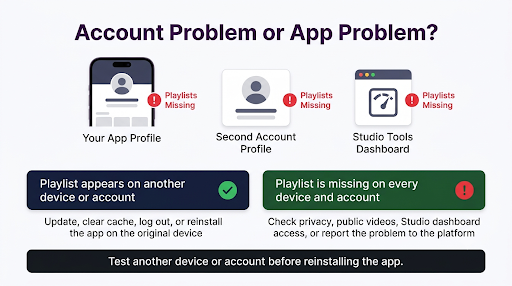
Open your profile on a second phone, a tablet, or a desktop browser at tiktok.com. If the playlist shows there, the problem is local to your first device. If it’s missing everywhere, it’s tied to your account or to TikTok’s servers.
Step 7: Reinstall TikTok
If nothing else works, delete the app and install it again. Make sure you know your login details first. Your posted videos and playlists are saved to your account, not your phone, but unposted drafts stored on the device can be lost when you uninstall.
Important Point to be Considered! Save any drafts you care about to your phone’s gallery before you reinstall TikTok. Drafts don’t always sync to your account.
Step 8: Report the Problem to TikTok
- Go to Profile and tap the Menu (☰) icon.
- Tap Settings and privacy, then Report a problem.
- Choose the closest topic, or describe the issue, and add a screenshot.
Mention whether you had playlists before, when they disappeared, and what you’ve already tried. Clear details help support act faster. There’s no guaranteed response time, so don’t expect access to appear on a set schedule.
Why Can’t I See Someone Else’s TikTok Playlists?
If you can’t see another creator’s playlists, the creator either made their account private, removed the playlists, or set the videos inside them to private. It can also be a glitch on your app.
Here’s how to narrow it down:
- Check other creators. If no one’s playlists load, it’s your app or a TikTok-wide bug. Clear your cache and log back in.
- Try a quick refresh. Some users report that swiping to another profile and then swiping back makes the playlist row load again.
- Look for a private account. If the creator went private and you don’t follow them, you won’t see their playlists.
- Ask the creator. They may have deleted or renamed the playlist.
What Does “No Internet Connection” Mean on TikTok Playlists?
When a TikTok playlist shows “No internet connection” while the rest of the app works, it’s almost always a loading bug, not a real network problem. Many users have seen this at the same time, which points to an issue on TikTok’s side.
Try switching between Wi-Fi and mobile data, update the app, and clear the cache. If it still won’t load, wait a day or two and check again. You can also look up “Is TikTok down” or check a site like Downdetector to see if other people are reporting the same thing.
Did TikTok Remove the Playlist Feature?
No, TikTok has not removed playlists. The feature is still listed in TikTok’s official help center. When playlists suddenly disappear for lots of people at once, it’s typically a temporary bug or a limited test, and the feature usually returns after an app update.
What Can You Do If You Don’t Have Playlists Yet?
If your account doesn’t have playlists, you can still organize a video series so viewers can follow it easily.
- Use clear part numbers. Add “Part 1,” “Part 2,” and so on to captions and on-screen text.
- Pin key videos. Pin the first video of a series to the top of your profile so new viewers start in the right place.
- Use matching covers. A consistent cover style or color makes a series easy to spot in your video grid.
- Link episodes together. Mention the previous and next part in captions or comments.
- Keep growing. The feature is commonly reported to appear as accounts grow, so posting consistently helps.
You may see videos claiming you can unlock playlists with a desktop “trick” or by switching account types and waiting two days. We couldn’t verify these as reliable methods, so don’t count on them.
Are Other TikTok Features Missing Too?
If playlists aren’t the only thing missing from your app, the cause is often the same: TikTok rolls out features gradually, and app bugs can hide several tools at once. For example, if you’ve also noticed TikTok Photo Mode not showing when you try to post, an outdated app or corrupted cache is usually behind both problems.
The same goes for sharing tools. If the TikTok repost button is missing alongside your playlists, check for an update first. And if past videos you watched have vanished too, our guide on fixing missing TikTok watch history walks through the settings that control it.
Common Mistakes to Avoid
- Assuming a deleted playlist is a bug. Check whether you or someone with access to your account removed it.
- Adding only private videos. A playlist full of Friends-only or Only You videos won’t appear for the public.
- Deleting the app before saving drafts. Reinstalling can wipe drafts stored on your phone.
- Paying for “playlist unlock” services. No third party can turn on TikTok features for your account. Treat these offers as scams.
- Changing too many settings at once. Try one fix at a time so you know what actually worked.
Frequently Asked Questions
How many followers do I need to have a playlist on TikTok?
TikTok doesn’t publish an official follower requirement. It only says playlists aren’t available to everyone. Most creators report getting access at around 10,000 followers, but some accounts get it earlier or later.
How do I get playlists on my TikTok profile?
If your account has the feature, go to Profile and tap Sort videos into playlists or Manage playlists in the posts tab. Name the playlist and add your public videos. It will appear on your profile above your video grid.
Why doesn’t my TikTok video show up on my profile?
A new video may still be processing or under review, set to Friends or Only You, or saved as a draft instead of posted. Check the video’s privacy setting and give it some time if it was just uploaded.
Can I see my own playlist if my account is private?
Yes. You can still view and manage your playlists on a private account. Only other people lose access to them until you switch back to public.
Does clearing TikTok cache delete my playlists?
No. Playlists are saved to your TikTok account, not your phone’s cache. Clearing the cache only removes temporary files and won’t touch your videos, playlists, likes, or followers.
Is a missing playlist a sign I’m shadowbanned on TikTok?
Not usually. A missing playlist is almost always about eligibility, privacy settings, or a bug. If you suspect restrictions, open TikTok Studio and check your account status for any violations or limits on your content.
Final Recommendation
If you’ve never had playlists, check your posts tab and TikTok Studio. If the option isn’t there, your account doesn’t have the feature yet, and organizing your series with part numbers and pinned videos is the best workaround for now.
If you had playlists and they vanished, make sure your account is public and each playlist has at least one public video. Then update TikTok, clear the cache, and log back in. That combination fixes most cases. If the problem still sticks around after a few days, report it through Settings and privacy so TikTok can look into your account directly.

Anica Lymus is a technical writer specializing in consumer applications, mobile operating systems, and practical troubleshooting workflows. At Primotechy, she covers account security, software glitches, and app performance across platforms such as Facebook, Instagram, and Snapchat. Drawing on hands-on device testing and in-depth research across iOS, Android, macOS, and Windows, Anica translates complex platform settings and sudden technical errors into clear, verified, step-by-step guides that readers can easily follow and trust.
View all posts by Anica Lymus →