
If your TikTok watch history is missing, it usually hasn’t been deleted. In most cases, TikTok moved it into the Activity center, the app needs an update, or a cached glitch is showing you a blank page. You can find it right now under Profile > Menu (☰) > Settings and privacy > Activity center > Watch history.
This guide shows you exactly where watch history lives in the current app, why the option disappears or stops updating, and the fixes that work on iPhone, Android, and TikTok Lite. You’ll also learn what to do when a specific video just won’t show up.
Contents
Quick Overview
| What you’re seeing | Most likely cause | Fastest fix |
| Watch history option is gone from Settings | TikTok moved it into Activity center | Settings and privacy > Activity center > Watch history |
| Watch history opens but is blank | Cache glitch, history turned off, or a buggy app build | Check the Watch history toggle, clear cache, update the app |
| Watch history not updating with new videos | Known bug in some app versions or a sync delay | Update TikTok, restart your phone, log out and back in |
| One specific video is missing | Watched over 180 days ago, deleted, made private, or it was a LIVE | Search with the Watched videos filter, check Likes and Favorites |
| Activity center is missing entirely | Gradual feature rollout or an outdated version | Update TikTok, then use Settings and privacy > Report a problem |
Where Is Watch History on TikTok Now?
Watch history now sits inside the Activity center, not directly in your Settings list. This move is the number one reason people think their TikTok watch history was removed. The old “Watch history” shortcut under Content and Activity was replaced on most accounts.
Here’s the current path on iPhone and Android:
- Open TikTok and tap Profile in the bottom-right corner.
- Tap the Menu (☰) icon in the top-right corner.
- Tap Settings and privacy.
- Scroll to the Content and Activity area and tap Activity center.
- Tap Watch history.
Your most recent videos appear at the top. Activity center also holds your comment history and search history, so it’s worth knowing this screen well. TikTok described Activity center in its official Activity center announcement as the place to find previously watched videos, and some accounts can filter watch history by date.
Pro Tip! Some versions also show a shortcut directly in the Menu (☰) list, above Settings and privacy. If you see “Activity center” there, you can skip a step.
How Long Does TikTok Keep Your Watch History?
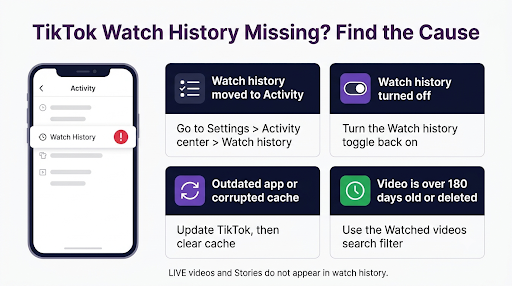
TikTok keeps watched videos in your watch history for 180 days. After that, older entries drop off automatically. So if you’re hunting for a video you saw last spring, it may simply be past the cutoff and not missing because of a bug.
What Doesn’t Show Up in Watch History?
Not everything you view gets logged. Keep these limits in mind before you assume the feature is broken:
- LIVE videos and Stories are not included in watch history.
- Videos deleted by the creator or set to private may disappear or show as unavailable.
- Videos you removed from your history won’t come back, and they also won’t appear in the Watched videos search filter.
- Videos watched on another account stay with that account. History doesn’t merge if you switch between personal and business profiles.
- Videos you only scrolled past for a second may not always register as watched.
Why Is My TikTok Watch History Missing?
Your TikTok watch history is usually missing because of a menu change, an outdated app version, a turned-off history setting, or a cache problem. Less often, TikTok is testing features on certain accounts and the option hasn’t rolled out to you yet.
Here’s a closer look at each cause:
- Menu relocation: The option moved into Activity center, so the old path no longer works.
- Old app build: Bugs in some versions caused watch history to stop recording or load blank. Users on Reddit reported that a later update fixed history for them.
- Watch history turned off: On versions that offer a toggle, history stops recording when it’s switched off.
- Corrupted cache: Stale data can make Activity center load empty or incomplete results.
- Network, VPN, or data saver: A weak connection or VPN can stop the list from loading.
- Feature rollout or testing: TikTok rolls features out gradually. Menu labels can vary by region, app version, and account.
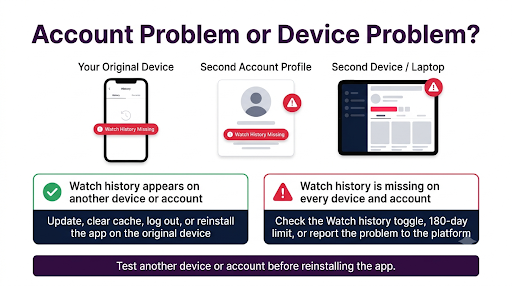
- Wrong account: If you manage more than one account, you may be looking at the one you didn’t use.
This kind of disappearing act isn’t unique to watch history. TikTok often moves or tests buttons, which is the same reason users find the TikTok repost button missing after an update.
How Do You Fix TikTok Watch History Not Showing?
Start with the simplest fixes: check Activity center, confirm watch history is turned on, update the app, and clear the cache. Most people get their history back within the first four steps. Work through them in order.
1. Make Sure Watch History Is Turned On
If your watch history page opens but stays empty, or it says history is paused, check the setting first.
- Go to Settings and privacy > Activity center > Watch history.
- Look for a gear or settings icon in the top-right corner.
- If you see a Watch history toggle, make sure it’s switched on.
Important Point to be Considered! Not every app version shows this toggle. If yours doesn’t, that’s normal. Turning history back on only records videos from that point forward. It won’t bring back videos watched while it was paused.
2. Force-Close TikTok and Check Your Connection
Swipe TikTok away from your recent apps, then reopen it. Switch between Wi-Fi and mobile data to rule out a weak signal. If the page still won’t load, restart your phone and try again.
3. Turn Off VPN, Data Saver, and Low Power Mode
VPNs can change your region and interfere with how TikTok loads account data. Data saver mode in TikTok, and Low Power Mode or battery saver on your phone, can also slow background loading. Turn these off temporarily, then reopen Activity center.
4. Update the TikTok App
An outdated build is one of the most common reasons TikTok watch history stops updating or the option goes missing. Open the App Store or Google Play, search for TikTok, and tap Update if it’s available. Then restart the app.
5. Clear TikTok’s Cache
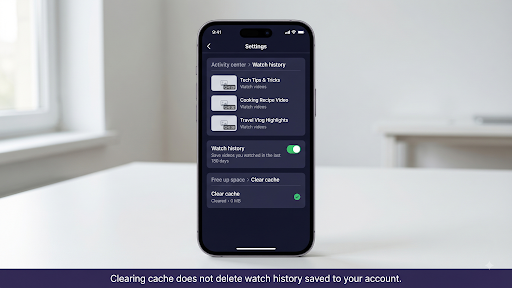
Clearing cache removes temporary files without deleting your account, drafts, or watch history saved on TikTok’s servers.
- Go to Profile > Menu (☰) > Settings and privacy.
- Tap Free up space.
- Tap Clear next to Cache.
- Reopen Activity center > Watch history.
Pro Tip! On Android, you can go deeper. Open phone Settings > Apps > TikTok > Storage > Clear cache. Only use Clear storage or Clear data if cache alone doesn’t work, since it signs you out and may wipe unsaved drafts.
6. Log Out and Log Back In
Signing out forces TikTok to reload your account data. Go to Settings and privacy, scroll down, tap Log out, restart your phone, and sign back in. Make sure you have your password or login method handy first.
7. Reinstall TikTok
If nothing else works, delete the app and install it fresh from the App Store or Google Play. Your watch history is tied to your account, not your phone, so it should reappear once you sign in. Save any drafts to your device before uninstalling, because drafts are stored locally and will be lost.
8. Report the Problem to TikTok
When watch history is missing from your menu completely, even after updating, report it. Go to Settings and privacy > Report a problem, choose the closest topic, and describe what’s missing. Include your phone model and app version if possible.
Why Is TikTok Watch History Not Updating With New Videos?
If your watch history shows old videos but nothing new, it’s usually a bug in your current app version or a sync delay. Users reported this exact problem after certain updates, where history froze on older videos and stopped logging new ones.
Try these in order:
- Watch a few videos fully, then close and reopen the app before checking again.
- Check the Watch history toggle, if your version has one.
- Install the latest TikTok update. Later builds have fixed this bug for many people.
- Clear cache and log out and back in to force a fresh sync.
If you deleted all your watch history recently, the list starts over from empty. That’s expected, and it will fill back up as you watch.
Why Is My Watch History Missing on TikTok Lite?
TikTok Lite has a simpler menu, so the Activity center path may not appear the same way. Many Lite users find their watched videos through search instead.
- Tap the search bar.
- Type a single period (.) and tap Search.
- Look for a View watch history link or open the filter options.
If neither option appears, update TikTok Lite or check whether your region’s version supports watch history yet.
How Do You Find a TikTok Video That’s Not in Your Watch History?
Use TikTok’s search with the Watched videos filter, then check your Likes, Favorites, and messages. These workarounds often find the video faster than scrolling through 180 days of history.
Use the Watched Videos Search Filter
- Tap the search bar and type a keyword, hashtag, or creator name you remember. Some users type a single period (.) to pull up broad results.
- Tap Search, then tap the filter icon.
- Turn on Watched videos and apply.
This only shows videos still saved in your watch history, so it won’t find anything you deleted or watched over 180 days ago.
Check Other Places Videos Hide
- Liked videos: The heart tab on your profile, if you tapped like.
- Favorites: The bookmark tab on your profile.
- Inbox: Videos you shared with friends or that someone sent you.
- Creator’s profile: If you remember the account, scroll their posts or check their playlists.
- Sounds and hashtags: Tap a sound or hashtag you remember to browse related videos.
If you’re digging through a creator’s playlists and the tab won’t load, that’s a separate glitch. Here’s how to fix a TikTok playlist not showing on a profile.
Download Your TikTok Data
Your account data file includes browsing activity, which can help if the in-app list won’t load at all.
- Go to Settings and privacy > Account > Download your data.
- Choose the data you want and select a file format (TXT or JSON).
- Tap Request data.
- Check the Download data tab later. The file can take some time to prepare.
Important Point to be Considered! Videos you already deleted from watch history are not included in your downloaded data. The file only reflects what TikTok still stores.
Can You See TikTok Watch History on a Computer?
Watch history is built for the TikTok mobile app, and desktop support is limited and inconsistent. Some users see an Activity center or history option in the web settings at tiktok.com, while others don’t see it at all. For the full 180-day list, use the iPhone or Android app.
Can You Recover Deleted TikTok Watch History?
No. Once you delete videos from your watch history, TikTok doesn’t let you restore them. There is no trash folder or undo option. Clearing cache, however, does not delete your history, so you don’t need to worry about that step.
If you deleted history by mistake, your best options are the search workarounds above: Likes, Favorites, shared messages, and the creator’s profile.
Common Mistakes That Make Watch History Look Missing
- Using an old tutorial: Guides from 2022 point to a Settings path that no longer exists.
- Checking the wrong account: Each account has its own separate history.
- Expecting LIVEs to appear: LIVE videos aren’t logged.
- Clearing all history by accident: The “Select all” option clears everything in one tap.
- Looking past 180 days: Older videos expire automatically.
- Skipping updates: Many history bugs are fixed in later versions.
Missing features after updates is a common pattern on TikTok. If photo posting options also vanished for you, see why TikTok photo mode is not showing and how to bring it back.
Frequently Asked Questions
Did TikTok remove watch history?
No, TikTok did not remove watch history for most users. It moved the feature into the Activity center, which is why the old Settings shortcut disappeared. If you can’t find Activity center at all, your app may need an update or the feature may still be rolling out to your account.
Why does my TikTok watch history only show a few videos?
A short list usually means you recently cleared your history, history was paused for a while, or the page didn’t fully load. Scroll down slowly to load more entries, and clear the cache if the list stays short.
Can other people see my TikTok watch history?
No. Your watch history is private and visible only to you. This is different from profile view history and post view history, which are separate settings that can show other users when you visited.
Why is my TikTok watch history missing on my new phone?
Watch history is saved to your account, so it should appear once you sign in to the same account on a new phone. If it’s blank, confirm you logged into the right account, update the app, and give it a few minutes to sync.
Does clearing TikTok cache delete my watch history?
No. Clearing cache only removes temporary files stored on your phone. Your watch history is stored on TikTok’s servers and stays in place.
Why does a video in my watch history say it’s unavailable?
The creator probably deleted the video, made it private, or TikTok removed it. The entry may stay in your history, but you won’t be able to play it.
What Should You Do Next?
Go straight to Profile > Menu (☰) > Settings and privacy > Activity center > Watch history first, since the menu change explains most missing-history reports. If the page is blank or not updating, check the Watch history toggle, update TikTok, and clear the cache. Still stuck after a reinstall? Report the problem from inside the app and use the Watched videos search filter in the meantime to find the clip you’re after.
Going forward, tap the bookmark icon on any video you might want again. Favorites don’t expire after 180 days, so it’s the most reliable way to never lose a TikTok again.

Anica Lymus is a technical writer specializing in consumer applications, mobile operating systems, and practical troubleshooting workflows. At Primotechy, she covers account security, software glitches, and app performance across platforms such as Facebook, Instagram, and Snapchat. Drawing on hands-on device testing and in-depth research across iOS, Android, macOS, and Windows, Anica translates complex platform settings and sudden technical errors into clear, verified, step-by-step guides that readers can easily follow and trust.
View all posts by Anica Lymus →