
If your Snapchat chats go through to everyone except one person, the problem is almost always tied to that one friendship or that person’s account, not your phone or internet. The most common causes are a removed friend, a block, a pending friend request, the other person’s privacy settings, or a stuck conversation thread. A bug on their phone, like an old app version, can also do it.
The good news is you can usually figure out which one it is in under five minutes. This guide shows you how to read the signs, which fixes to try first, and when there’s nothing left to fix on your end.
Contents
Quick Overview
- Send a test chat to a different friend. If it works, your connection and app are fine.
- Check their profile. Search their username and see if their profile, Snap Score, and Story still show up.
- Look at the status icon. A gray “Pending” arrow usually means they haven’t added you as a friend.
- Try a Snap instead of a text chat (or the other way around) to see which one fails.
- Clear the conversation and your app cache, then reopen Snapchat.
- Ask the other person to update Snapchat, restart their phone, and check their Contact Me setting.
Why Is My Snapchat Chat Not Sending to Just One Person?
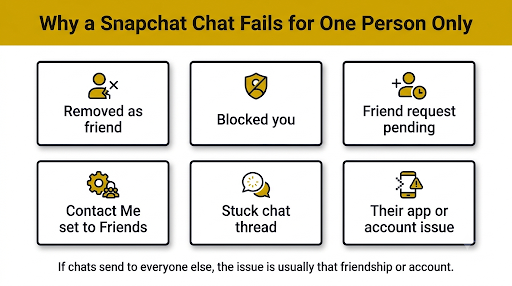
When only one chat fails, Snapchat is usually blocking delivery because of the relationship between your two accounts. A Wi-Fi drop or full storage would break sending to everyone, not just one friend.
Here are the real causes, from most to least likely:
- They removed you as a friend. If their privacy settings only allow friends to contact them, your messages can’t get through.
- They blocked you. Messages won’t deliver, and their profile usually disappears from your search.
- Your friend request is still pending. You added them, but they never added you back.
- Their Contact Me setting is set to “Friends.” If you’re not a mutual friend, Snapchat won’t deliver your chats.
- The conversation thread is glitched. One chat can get stuck in a bad state while every other chat works normally.
- The problem is on their phone. An outdated app, poor connection, or full storage on their side can stop messages from landing.
- Their account is deleted, deactivated, locked, or banned. Snapchat can’t deliver to an account that isn’t active.
Your job is to rule these out one at a time, starting with the ones that need zero changes to your phone.
How Do You Know Whether the Problem Is You or Them?
Send a short text chat to another friend right now. If it sends instantly, the issue is with that one person. If it also fails, you’re dealing with a general sending problem, and our guide on Snapchat messages failing to send walks through the network and app fixes in detail.
Then run these quick tests on the broken conversation:
| Test | What It Tells You |
| Send a plain text chat | Text uses very little data. If even this fails, it points to a friendship or account issue. |
| Send a photo Snap | If Snaps show “Pending” but chats fail, they likely haven’t added you back. |
| Message them in a group chat you’re both in | If group messages work but private chats don’t, their privacy settings are probably limiting direct contact. |
| Try Snapchat on the web or another device | If it works there, the thread is likely stuck on your phone, and clearing data should help. |
| Ask a mutual friend to message them | If that friend also can’t reach them, their account or phone is the problem. |
Tip: Don’t reinstall Snapchat or reset your phone until you’ve done these tests. If only one person is affected, those big steps rarely help.
What Do the Different Snapchat Sending Messages Mean?
The icon or error under your message is the fastest clue. Each one points to a different cause.
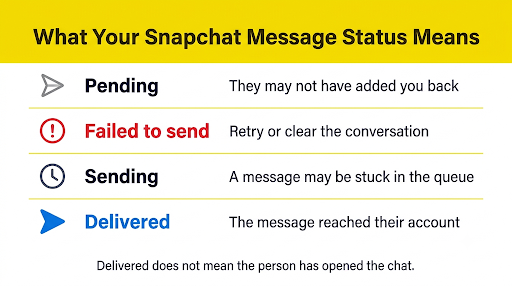
| What You See | Most Likely Meaning | What to Do |
| Gray arrow with “Pending” | They haven’t added you as a friend, or they removed you | Check if you’re still friends. You can’t force delivery. |
| “Failed to send” with a red icon | Delivery was rejected or the thread is stuck | Tap to retry once, then clear the conversation |
| Stuck on “Sending” or “Waiting to send” | An earlier message in that chat is still stuck in the queue | Close the app fully, reopen it, and retry |
| “Could not refresh” | A sync problem with Snapchat’s servers | See our fix for Snapchat messages not refreshing |
| An error code like C14A | A connection or server-side error, often during login or sync | See our guide to the Snapchat C14A error |
| “Delivered” but never “Opened” | Your chat went through. They just haven’t viewed it yet. | Nothing is broken. Give them time. |
That last row matters more than people think. A lot of “not sending” worries are really “not opened” situations. If it says Delivered, Snapchat did its job.
How Can You Tell If Someone Blocked or Removed You on Snapchat?
Snapchat never sends a notification when someone blocks or unfriends you, but the signs are pretty clear once you know what to look for.
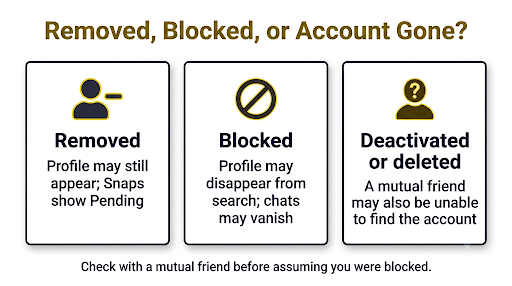
Signs You Were Removed as a Friend
- Your Snaps to them stay on “Pending” with a gray arrow.
- You can still find their profile in search, but you can’t see their Snap Score anymore.
- Their Stories stop showing up for you, even though they still post (if a mutual friend can confirm).
- An “Add” button may appear on their profile again.
Signs You Were Blocked
- Their name doesn’t show up at all when you search their exact username.
- Your chat history with them may disappear from your Chat feed.
- Their profile won’t load, or you can’t open it from an old conversation.
- A mutual friend can still find them easily.
Be careful about jumping to conclusions. A deleted or deactivated account looks almost the same as a block from your side. So does a temporarily locked account. If a mutual friend also can’t find them, the account is probably gone or disabled, not blocking you.
How Do You Fix Snapchat Chats Not Sending to One Person?
If the friendship looks normal and you’re still stuck, the conversation thread itself is the likely culprit. Work through these fixes in order. Each one is a little more involved than the last.
1. Force-Close Snapchat and Reopen It
Swipe Snapchat away from your recent apps, wait a few seconds, then open it again. This clears a message stuck in the sending queue, which is the most common reason a single chat freezes.
2. Restart Your Phone
Turn your phone completely off, wait about a minute, then turn it back on. Snapchat’s own support team suggests a full restart like this as an early fix because it resets the network connection and app memory at the same time.
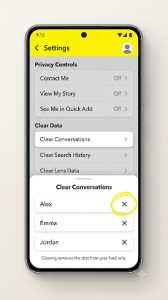
3. Clear the Conversation
Clearing the conversation removes the stuck thread from your Chat feed so Snapchat can build a fresh one.
- Tap your profile icon, then the gear icon to open Settings.
- Scroll to Privacy Controls and tap Clear Data.
- Tap Clear Conversations.
- Tap the X next to the person’s name.
- Go back to Chat, start a new message to them, and try again.
Good to know: Clearing a conversation removes it from your feed only. Saved messages in that chat stay saved, and the other person still sees the conversation on their side.
4. Clear Snapchat’s Cache
A corrupted cache can keep one chat stuck even after a restart. Open Settings, then look for Clear Cache. Depending on your app version, it’s under Account Actions or Privacy Controls > Clear Data. Clearing the cache doesn’t delete your Memories, Snaps, or Chats.
5. Update Snapchat on Both Phones
This is the step most people skip. Both you and your friend should be on the latest version. An outdated app on their side can break delivery for messages sent from newer versions. Check the App Store or Google Play Store for an update, and ask them to do the same.
6. Log Out and Log Back In
Signing out forces Snapchat to re-sync your friends list and conversations from its servers. Make sure you know your password or have access to your verification method before you log out.
7. Reinstall Snapchat as a Last Resort
If nothing else works, uninstall and reinstall the app. Before you do, check that your Memories are backed up, since this is the only step with real risk. Honestly, if only one person is affected and the earlier steps failed, reinstalling rarely changes the result.
What Should the Other Person Check on Their End?
Sometimes the fix isn’t on your phone at all. If you can reach this person another way, like a text message or another app, ask them to check a few things.
- Their friends list: Are you still on it? They may have removed you by accident.
- Contact Me setting: In Settings, under Privacy Controls, tap Contact Me. If it’s set to “Friends” and you aren’t a mutual friend, your chats won’t reach them.
- Their app version: They should update Snapchat and restart the app.
- Their connection and storage: A weak signal or a full phone can stop incoming chats from loading.
- Account warnings: If their account is locked or has a restriction, Snapchat shows a message in the app or at login.
Here’s a real-world example. Two friends stop being able to chat after one of them gets a new phone and reinstalls Snapchat. One phone has the newest version, the other is several updates behind. Neither person blocked anyone. Updating the older app fixes it in seconds.
Can Snapchat Restrict Your Account From Messaging?
Yes. Snapchat can quietly limit sending if your account activity looks spam-like, such as adding lots of people quickly or sending the same message to many users. In that case, problems usually show up with new or non-mutual contacts first, and you may not get a clear warning.
If that sounds like you, slow down. Stop adding new friends for a while and avoid mass messaging. Most soft limits ease up on their own after some normal, low-key use.
For more serious issues, Snapchat shows an account lock or warning message. If you see one, follow the steps in the app or on Snapchat Support.
What Mistakes Make This Problem Worse?
- Resending the same message over and over. This can pile up stuck messages in the queue and make the thread harder to clear.
- Re-adding someone repeatedly. If they removed you on purpose, repeated requests can look like harassment and may trigger a block or report.
- Using third-party “who blocked me” apps. They can’t see Snapchat’s private data, and they often ask for your login, which puts your account at risk.
- Reinstalling first. It’s the slowest step and the least likely to fix a one-person problem.
- Assuming a block without checking. A deleted, locked, or outdated account can look the same from your side.
When Should You Contact Snapchat Support?
Reach out to Snapchat when you’ve confirmed you’re still mutual friends, the other person sees no warnings, both apps are updated, and chats still won’t send. That points to an actual bug.
You can report it from inside the app through Settings under I Need Help or the report-a-problem option. On many devices, you can also shake your phone while Snapchat is open to report a bug. Include the exact error message, your phone model, your app version, and when the problem started. It also helps to check Snapchat Support on X for any known issues before you file a report.
Frequently Asked Questions
Why do my Snapchat chats send to everyone except one person?
Usually because something changed in your friendship status or their privacy settings. Being removed, blocked, or still pending is the top cause. If you’re still mutual friends, a stuck conversation thread or an outdated app on their phone is the next most likely reason.
Does “Pending” on Snapchat mean I’m blocked?
Not necessarily. Pending usually means the person hasn’t added you back or removed you as a friend. A block tends to hide their profile from your search completely, which is a stronger sign.
Why can I send Snaps but not chats to one person?
Chats and Snaps don’t always fail the same way. If Snaps work and chats don’t, the chat thread itself is often stuck. Clear that conversation from Settings and start a new chat with them.
Will they get my old messages after the problem is fixed?
Sometimes. A message stuck on “Sending” may go through once the connection or thread recovers. A message marked “Failed to send” usually won’t deliver on its own, so you’ll need to send it again.
Can someone restrict who messages them without blocking anyone?
Yes. The Contact Me setting lets people limit messages to “Friends” or “Friends and Contacts.” If you’re not on their friends list, your chats won’t reach them, even though they never blocked you.
Does clearing a conversation delete it for the other person?
No. Clearing a conversation only removes it from your Chat feed. The other person can still see their side of the chat, and saved messages stay saved.
Is Snapchat down if I can’t message one person?
Almost never. An outage usually affects everyone you chat with, plus Stories and loading. If only one chat is broken, the cause is that conversation or that account.
What Should You Do Next?
Start with the fastest check. Send a chat to another friend, then search the person’s username. If they’ve vanished from search or your Snaps say Pending, the issue is the friendship, and no app fix will change it. If everything looks normal, clear the conversation, clear your cache, and have both of you update Snapchat. That combination fixes most one-person sending problems. If it still fails after all that, report it to Snapchat with the exact error you see.

Anica Lymus is a technical writer specializing in consumer applications, mobile operating systems, and practical troubleshooting workflows. At Primotechy, she covers account security, software glitches, and app performance across platforms such as Facebook, Instagram, and Snapchat. Drawing on hands-on device testing and in-depth research across iOS, Android, macOS, and Windows, Anica translates complex platform settings and sudden technical errors into clear, verified, step-by-step guides that readers can easily follow and trust.
View all posts by Anica Lymus →