
Snapchat error SS18 means Snapchat has banned the device you are using, not just one account. It shows up when Snapchat detects abuse or repeated Community Guidelines violations tied to that phone or tablet. Snapchat Support says it cannot unban a device for you, so your realistic options are an in-app appeal (if you are eligible) or using Snapchat on a different device.
This guide explains what the SS18 support code really covers, which fixes are a waste of time, how appeals work, and what to do if you bought a used phone. It also covers the scams that target people in this exact spot.
Contents
Quick Overview
- What SS18 is: a device-level ban. Snapchat treats SS18 and SS06 the same way.
- What does not fix it: reinstalling the app, clearing the cache, changing your password, switching Wi-Fi, or making a new account on the same device.
- What can help: an in-app appeal if the option appears, or logging in from another device to check that your account itself is fine.
- What to avoid: “unban services,” bypass tools, and anyone asking for your password or a verification code.
- Be realistic: Snapchat does not promise to lift device bans and does not share what triggered them.
What Does SS18 Mean on Snapchat?
SS18 is a login error code that means your device is banned. Snapchat’s own support page says the SS18 and SS06 error codes both indicate a banned device caused by abuse or repeated violations of its Community Guidelines. You can see it when you try to log in or when you try to create a new account.
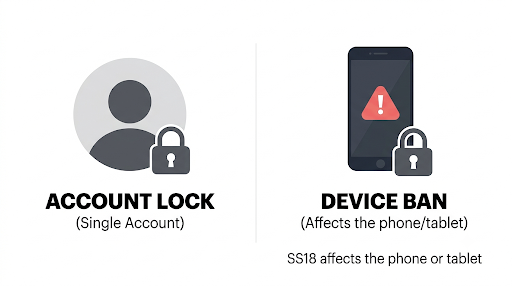
The key word is device. Snapchat describes the block as applying to the phone or tablet you are using, not only to one account. That is why a brand new account hits the same wall.
Is SS18 a Device Ban or an Account Lock?
It is a device ban. An account lock is a different problem and usually comes with its own message, often the SS04 code. If you see both a device-banned message and a locked-account message, Snapchat says to follow the instructions in the lock message too.
SS18 vs SS06 vs SS07: How Do They Differ?
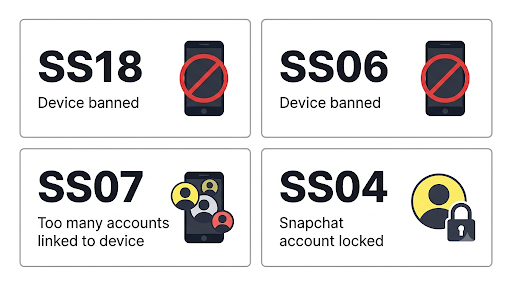
Snapchat treats SS18 and SS06 as the same thing. Some third-party guides claim SS18 pops up for milder violations, but that is user-reported and unconfirmed by Snapchat. In practice the result is identical.
| Code | What Snapchat says it means | Level |
| SS18 | Device banned for abuse or repeated violations | Device |
| SS06 | Device banned for abuse or repeated violations | Device |
| SS07 | Device banned because too many accounts were linked to it | Device |
| SS04 | The account you are logging in to is locked | Account |
| SS10 | Device does not meet integrity requirements | Device |
| SS01, SS03, SS08 | Access temporarily disabled after failed attempts or unusual activity | Temporary |
If your screen says SS06 instead, the situation is the same. The guide on how to handle the SS06 error walks through that version.
Why Does Snapchat Say Your Device Is Banned?
Snapchat says device bans come from activity that violates its Community Guidelines, or from other reasons related to safety or compliance. It will not tell you what exactly triggered yours. It explains that keeping those details private helps its enforcement systems work.
Common patterns people report include:
- Repeated account bans or locks from the same phone
- Spam-like behavior, such as mass friend requests or mass messaging
- Using modified or third-party versions of Snapchat
- Creating account after account to get around a previous ban
Treat that list as pattern-spotting, not official causes. Snapchat does not confirm which behavior caused any individual ban.
How Do You Fix Snapchat SS18?
There is no quick self-service fix for SS18. The honest answer is that you can appeal if you are eligible, or move to a different device. Everything else people suggest online either does nothing or risks making things worse.
What Does Not Work
- Reinstalling Snapchat. The ban is not stored in the app.
- Clearing the cache. Snapchat recommends this for the C02A unknown error, not for device bans.
- Changing your password. The block is on the device, so the password is not the issue.
- Switching between Wi-Fi and mobile data. Your network is not what Snapchat flagged.
- Making a new account. Snapchat states that users with a banned device cannot create new accounts on that device.
Repeatedly trying new accounts also looks like the exact behavior that gets devices banned, so it is worth stopping.
What You Can Try, In Order
- Update Snapchat. Install the latest version from the App Store or Google Play. This will not remove an SS18 device ban, but it rules out an outdated app before you test another device.
- Test another device. Log in to your account on a different phone or tablet. If it works, Snapchat says that usually means your account is unaffected and the problem is the first device.
- Check for a lock message. If you also see an account-locked notice, follow it. That is a separate problem with its own path.
- Look for the appeal option. If the screen offers one, use it. The next section covers how.
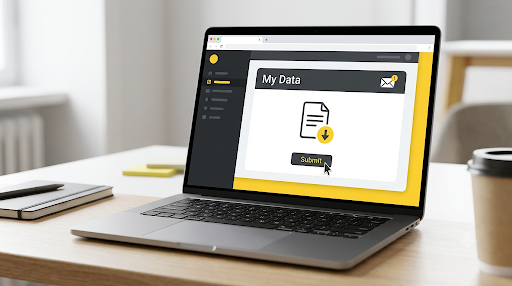
- Download your data if you can log in elsewhere. Snapchat’s data export lives at accounts.snapchat.com under “My Data,” and it is worth grabbing your Memories and chats while you have access.
How Do You Appeal a Snapchat SS18 Device Ban?
Open Snapchat, try to log in, and look for an Appeal Decision button on the pop-up. If that button shows up, you can submit an appeal. If it does not, Snapchat’s appeals page says the enforcement is not eligible for an in-app appeal.
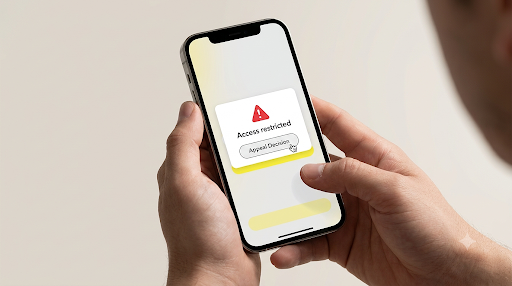
Snapchat’s support article on device bans says that when a device ban comes from enforcement action on your account, you may be able to appeal through the in-app mechanism. If Snapchat grants the appeal, it also removes the device ban. That is the only official route to an SS18 unbanned outcome.
What to Expect After You Appeal
- Snapchat’s appeals guide says the original enforcement generally stays in place while your appeal is reviewed.
- The team aims to respond within about two weeks, though that is a rough estimate.
- The decision can be upheld, modified, or reversed.
- Snapchat emails the result, so make sure you can access the email tied to your account.
- For account-lock appeals, Snapchat gives a six-month window from the day you were notified. It does not state the same window specifically for device bans, so do not wait.
Do not appeal through random forms, social media DMs, or “support” accounts. Snapchat says the in-app process is the only appropriate way to appeal an account lock, and going around it will not speed anything up.
Can You Contact Snapchat Support About SS18?
You can contact Snapchat Support, but the article on login errors says plainly that support cannot unban a device. Its device-ban article also says Snapchat generally does not make exceptions outside the appeal route. A support ticket is fine for asking questions, but do not expect Support to remove the device ban.
Does SS18 Follow You to a New Phone or Another Account?
The ban is attached to the device, so a new phone is a new start. A different phone or tablet that is not banned should let you log in to your existing account, as long as the account itself is not locked.
- Different account, same phone: still blocked. The device is the problem.
- Same account, different phone: usually works, unless the account has its own lock.
- Locked account: stays locked no matter which device you use.
One caution. Some users report that logging in to a banned account on a clean device can create new problems for that device. Snapchat does not document that, so I cannot confirm it. If you are borrowing a friend’s phone, tell them first so nobody is surprised.
What If You Bought a Used or Refurbished Phone?
You can inherit a device ban. Snapchat acknowledges that a ban can affect people who bought or received a phone or tablet previously used by someone whose actions triggered it. This is the most frustrating version of SS18 because you did nothing wrong.
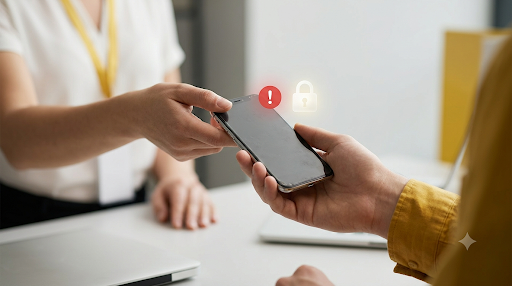
Snapchat’s stance is firm here. It says it generally does not unban a device in most other cases, even if you just bought the phone, it is refurbished, you do not know the previous owner, or you believe the ban was a mistake.
How to Avoid This Before You Buy
- Install Snapchat and try to create or log in to an account before you finalize a used phone purchase.
- Ask the seller about return terms in case the phone turns out to be flagged.
- If it is already yours and banned, ask the seller for a refund or exchange, then run the same test on the replacement.
How Long Does an SS18 Ban Last?
Snapchat does not publish an expiration for SS18. Unlike the temporary SS01, SS03, and SS08 errors, where Snapchat suggests waiting 48 hours, the device-ban page gives no waiting period. Plan as if it is open-ended unless an appeal is granted.
What Should You Avoid? SS18 Unban Scams and Bypass Tricks
There is no legitimate bypass for a Snapchat device ban. Anyone offering a “free unban,” a paid unban service, or a hack is either scamming you or selling something that can get you in deeper trouble. Because people with SS18 are stressed and out of options, they are an easy target.
Watch for these:
- “Snapchat employee” offers. Real support does not sell unbans and does not take payment through DMs.
- Password requests. Never share your Snapchat password with anyone who promises to fix the ban.
- Verification code requests. A code sent to your phone or email is the key to your account. Handing it over lets someone else take control.
- Upfront payments or gift cards. A paid “fake unban” usually ends with no unban and a lost payment.
- Tools that spoof your device. Modified apps, device-ID changers, and similar tools break Snapchat’s rules and can lead to more enforcement. Snapchat also has an SS10 error for devices that fail its integrity checks.
Snapchat also asks users to stay within its Community Guidelines. Reading them is the best way to avoid a repeat ban on any future device.
FAQs
Can I use Snapchat on another device after SS18?
Yes, usually. A phone or tablet that is not banned should let you log in to your existing account. If it does, your account is fine and only the first device is blocked. An account that is locked separately will still be locked.
Will SS18 ban my account or my phone?
It bans your phone or tablet. Your account may or may not be affected, and the quickest way to find out is to log in from a different device. Snapchat shows a separate message if the account itself is locked.
Why am I getting SS18 when I never broke any rules?
Two common reasons: you are on a phone someone else used before you, or something tied to your device triggered an automated flag. Snapchat does not share what caused a specific ban, and it says the ban may affect people who bought or received a previously used device. If an appeal option shows up, use it and keep the message short and factual.
Is the SS18 ban permanent?
Snapchat does not state a time limit, and it does not describe the ban as temporary. Third-party guides call it permanent. The only documented way to remove it is a granted in-app appeal.
Can I create a new Snapchat account after SS18 on a different phone?
Yes, on a different device that is not banned. Snapchat only blocks new accounts on the banned device itself. Creating several accounts to dodge a ban can trigger SS07, which means too many accounts are tied to a device, so go slowly.
Should I trade in or sell the banned phone?
Be upfront with a buyer. The ban stays with the device, so the next owner would hit the same error. If you are replacing it, test Snapchat on the new phone before you give up the old one.
Final Recommendation
Start by logging in on another phone or tablet to see whether your account is safe. If it is, move your Snapchat use there and download your data. Then open Snapchat on the banned device and look for Appeal Decision. If it appears, submit one calmly and wait for the email.
If no appeal option appears, assume the ban is staying put. Do not pay anyone, do not share codes, and do not keep creating accounts on the same phone. If the phone was used when you bought it, go back to the seller for a refund or swap.

Anica Lymus is a technical writer specializing in consumer applications, mobile operating systems, and practical troubleshooting workflows. At Primotechy, she covers account security, software glitches, and app performance across platforms such as Facebook, Instagram, and Snapchat. Drawing on hands-on device testing and in-depth research across iOS, Android, macOS, and Windows, Anica translates complex platform settings and sudden technical errors into clear, verified, step-by-step guides that readers can easily follow and trust.
View all posts by Anica Lymus →