
If your Snapchat Snap Score is not updating, the most common reason is simple: you are sending chats, not Snaps, or Snapchat’s servers have not synced your activity yet. Only photo and video Snaps, Snaps you receive, and Stories you post move the number. Text messages, voice notes, and calls do not.
The good news is that a stuck score is almost never a sign that your account is broken. In most cases, a short wait, an app restart, or a cache clear brings the number back to life. If you are looking at a friend’s score instead of your own, the reason can be quite different, and we cover that too.
Contents
Quick Overview
| What you see | Most likely cause | What to do |
| Your score did not go up after chatting | Text chats do not count toward Snapscore | Send or open a photo or video Snap |
| Your score is stuck after sending Snaps | Server delay or batch updates | Wait 15 to 60 minutes, then restart the app |
| Score still frozen after a few hours | Cached profile data or an outdated app | Clear cache, update Snapchat, log out and back in |
| A friend’s score has not changed in days | They are not sending Snaps, or your app shows old data | Refresh their profile later before assuming anything |
| A friend’s score disappeared | They removed you as a friend or blocked you | Check if you can still find and Snap them |
| Snapchat+ Snapscore Change shows nothing | Feature toggle is off, or no change since your last check | Turn it on in the Snapchat+ menu and check again later |
How Does Snapchat Snap Score Actually Work?
Your Snapscore is a running total built from the Snaps you send, the Snaps you receive, the Stories you post, and a few other factors Snapchat has never fully explained. The exact formula is private, so no one outside Snapchat can promise how many points a single action gives you.
Here is what we know with reasonable confidence:
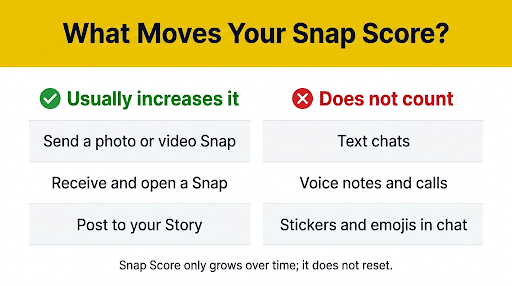
- Counts: Sending photo or video Snaps, receiving and opening Snaps, and posting to your Story.
- Does not count: Text chats, emojis, stickers sent in chat, voice notes, audio or video calls, and simply opening a conversation.
- Cannot go down: Snapchat says there is no way to lower or reset a Snapscore. It only grows over time.
- Visible to friends only: Your score shows under your name on your Profile, and friends can see it on your Friendship Profile. Non-friends cannot see it.
Many users also report that sending one Snap to a big group does not give one point per person, and that resending the same Snap again and again adds little or nothing. Snapchat has not published these rules, so treat them as community findings, not official policy.
You can read Snapchat’s own explanation of the score and other account basics on the official Snapchat Support site.
How Often Does Snap Score Update?
Snap Score does not always update instantly. Your own score often changes within a few minutes of sending or opening a Snap, but it can take longer when Snapchat’s servers are busy.
Snapchat appears to process score changes in batches rather than adding a point the second you tap send. That is why you might send ten Snaps, see no change, and then watch the number jump all at once later.
A friend’s score usually lags behind even more. Their number has to update on Snapchat’s servers, and then your app has to fetch that new number. Depending on cached data, you may be looking at a score that is several hours old.
A good rule of thumb: give your own score up to an hour and a friend’s score up to a day before you start troubleshooting. Some users on Reddit and YouTube report delays of 24 to 48 hours during larger glitches.
Why Is My Snapchat Score Not Updating?
Your Snap Score usually stops updating for one of these reasons:
- You are mostly chatting. Long text conversations feel active, but they add zero points.
- Your Snaps did not actually send. A Snap stuck on “Sending” or “Failed” never reaches the server, so it cannot count.
- Server or sync delay. Snapchat may be slow to process activity, especially during busy hours or outages.
- Stale cache. Your app may be showing a saved copy of your Profile instead of fresh data.
- Weak or unstable internet. Switching between Wi-Fi and mobile data mid-session can interrupt syncing.
- Outdated app version. Older builds can carry bugs that affect profile refresh.
- VPN, data saver, or background restrictions. These can block Snapchat from talking to its servers smoothly.
Point two is easy to miss. If you see red “Failed to Send” labels, fix that first. Our guide on fixing the Snapchat “Failed to Send, Tap to Try Again” error walks through it step by step.
How Do You Fix Snapchat Score Not Updating?
Work through these fixes in order. Start with the quick ones and move to the bigger steps only if your score is still frozen.
1. Make sure you are sending real Snaps
Open the camera, take a photo or video, and send it to a friend. Then open a Snap someone sent you. This is the fastest way to test whether your score moves at all. If you only send chats, nothing will change no matter how active you are.
2. Wait, then check again
Give it 15 to 60 minutes. Because updates come in batches, checking your Profile every 30 seconds will not speed anything up. Close the app, do something else, and come back.
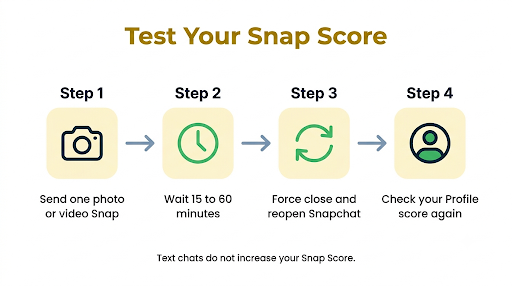
3. Force close and reopen Snapchat
- iPhone: Swipe up from the bottom of the screen and pause to open the app switcher. Swipe Snapchat up to close it, then reopen it.
- Android: Open Recent apps and swipe Snapchat away. For a harder stop, go to Settings > Apps > Snapchat > Force stop.
Reopening forces the app to request fresh Profile data from Snapchat’s servers.
4. Check your internet connection
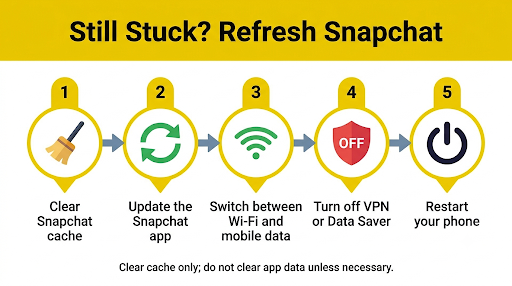
Switch from Wi-Fi to mobile data, or the other way around. Turn Airplane Mode on for 10 seconds and then off. If you use a VPN, pause it and test again. A connection that loads videos fine can still drop small sync requests.
If your chats also refuse to load, the problem is bigger than your score. See our fix for Snapchat “Could Not Refresh” messages, since the same sync issues often cause both.
5. Clear Snapchat’s cache
Clearing the cache removes old saved data so your app has to pull the latest score. It does not delete your Memories, chats, or Snaps.
- Open Snapchat and tap your Profile icon.
- Tap the gear icon to open Settings.
- Scroll to Account Actions and tap Clear Cache.
- Confirm, then restart the app.
On Android, you can also go to Settings > Apps > Snapchat > Storage > Clear cache. Do not tap “Clear data” or “Clear storage” unless you are ready to log in again. Menu names can vary slightly by phone brand and Snapchat version.
6. Update Snapchat
Open the App Store on iPhone or Google Play on Android, search for Snapchat, and tap Update if it appears. Score display bugs are often fixed quietly in new releases.
7. Log out and log back in
Go to Profile > Settings, scroll to the bottom, and tap Log Out. Sign back in with your username and password. This forces a full resync of your account data. Make sure you know your password before you try this.
8. Offload or reinstall the app
- iPhone: Go to Settings > General > iPhone Storage > Snapchat > Offload App, then tap Reinstall App. Offloading keeps your app data while replacing the app itself.
- Android: Uninstall Snapchat from Google Play or your app drawer, restart your phone, and install it again.
Anything saved to Memories is backed up to your account, but Snaps only saved on your phone’s camera roll are not affected either way. Unsaved chats may disappear based on your chat settings, so save anything important first.
9. Check if Snapchat is down
If none of the above works, the problem may be on Snapchat’s side. Check the Snapchat page on Downdetector’s Snapchat outage tracker to see if many people are reporting issues right now. If there is an outage, there is nothing to fix on your phone. Just wait.
10. Contact Snapchat Support
If your own score has not moved for several days even though you are clearly sending and opening Snaps, report it from inside the app. Go to Profile > Settings > I Need Help (or Support, depending on your version) and describe the issue.
Why Is Someone’s Snap Score Not Going Up but They Are Active?
A friend can look active and still have a frozen score. Usually it is not a sign of anything personal.
- They are only chatting. Someone can text all day and never earn a point.
- Your app shows old data. Their score may have changed on the server, but your app has not refreshed it yet. Close Snapchat and check their profile again later.
- Batch updates. Their score may jump all at once in a few hours.
- They are watching, not sending. Viewing Stories, Spotlight, or Discover content does not reliably move the score the way sending Snaps does.
Seeing a friend’s score go up while they have not replied to you also does not prove they are ignoring you. They might be sending Snaps to a streak, posting to their Story, or opening Snaps from other friends. A score is a very blunt tool for reading someone’s behavior.
What Does It Mean If a Friend’s Snap Score Disappears or Stays Frozen for Days?
If you cannot see the score at all, the most likely reason is that the person removed you as a friend or blocked you. Snapchat only shows scores between friends. You might also notice that your Snaps to them stay on “Pending.”
If the score is visible but stuck for a long time, the person may have stopped using Snapchat, may be taking a break, or may have deactivated their account. A score that has not moved in weeks is more likely a sign of inactivity than of anything aimed at you.
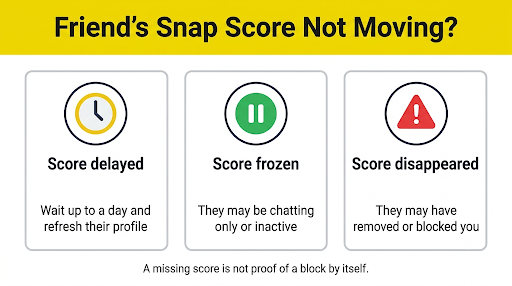
Before jumping to conclusions, try sending them a Snap. If it says “Delivered” normally, you are still connected. If messages seem to vanish, our guide on Snapchat messages that say sent but not delivered explains what each status means.
Why Is Snapchat+ Snapscore Change Not Working?
Snapchat+ subscribers can see how much a friend’s Snapscore has grown since the last time they checked, by tapping the score on that friend’s Friendship Profile. If this feature shows nothing or seems broken, check these points:
- The toggle is off. Tap your Profile, open the Snapchat+ menu, and make sure Snapscore Change is turned on.
- Nothing changed yet. If you checked a few minutes ago and your friend has not sent new Snaps, the change will read zero.
- Your subscription lapsed. If Snapchat+ expired or a payment failed, the feature stops working.
- Old app version. Update Snapchat, since Snapchat+ features often depend on the latest build.
Snapchat+ also has a Snapscore Multiplier option. When it is on, your score can grow twice as fast when you exchange Snaps with other Snapchat+ subscribers. It is off by default and does nothing for Snaps with non-subscribers, so do not expect a faster score if your friends do not have Snapchat+.
Is a Snap Score Glitch Different on iPhone and Android?
The causes are the same, but a few fixes differ by device.
| Fix | iPhone | Android |
| Clear cache | In-app only: Profile > Settings > Clear Cache | In-app, or Settings > Apps > Snapchat > Storage |
| Reinstall without losing app data | Offload App in iPhone Storage | Not available; a full uninstall is needed |
| Background syncing | Turn on Background App Refresh for Snapchat | Remove battery optimization limits for Snapchat |
| Data limits | Turn off Low Data Mode | Allow unrestricted data use for Snapchat |
Android phones from Samsung, Xiaomi, and other brands are known for aggressive battery saving. If Snapchat is “sleeping” in the background, it may not sync until you open it again. Setting Snapchat to Unrestricted battery use can help.
Common Mistakes That Make the Problem Seem Worse
- Refreshing every few seconds. It does not trigger an update and makes a normal delay feel like a bug.
- Sending the same Snap to everyone repeatedly. It adds very little and can look like spam behavior.
- Using third-party “Snap Score booster” apps or sites. These do not work and can put your account at risk of being locked. Never share your login with them.
- Tapping “Clear data” instead of “Clear cache” on Android. That logs you out and resets local settings.
- Assuming a frozen friend score means you were blocked. Inactivity and stale data are far more common causes.
Frequently Asked Questions
Does a Snap Score update if the Snap is not opened?
Your score usually goes up when you send a Snap, even before the other person opens it. The receiver typically earns their part when they open it. Snapchat has not shared the full rules, so small timing differences are normal.
Can someone freeze or hide their Snap Score?
No. There is no setting to freeze, hide, or pause a Snapscore from friends. Ghost Mode only hides your location on Snap Map and does not affect your score. If a score looks frozen, the person is likely just not sending Snaps.
Why did my Snap Score jump by a lot all at once?
Big jumps usually happen when delayed updates catch up in one batch. A burst of sending, opening Snaps, and posting Stories in a short time can also produce a noticeable rise.
Does my Snap Score go up from watching Stories or Spotlight?
Snapchat names sending Snaps, receiving Snaps, and posting Stories as score factors. Watching Stories, Spotlight, or Discover is not officially listed, so do not rely on it to raise your number.
Can my Snap Score go down or reset?
No. Snapchat says there is no way to lower or reset a Snapscore. If your score looks lower than before, your app is most likely showing a cached number. Clear the cache and restart the app.
Do Snap Scores update on Snapchat for Web?
Snaps you send and receive through Snapchat on the web still go through the same account, but the web version focuses on chats and calls. For the most accurate score, check your Profile in the mobile app.
Final Recommendation
If your Snapchat Snap Score is not updating, start by sending a real photo or video Snap and waiting up to an hour. If the score still will not move, force close the app, clear the cache, and update Snapchat. Those three steps fix the vast majority of stuck scores on both iPhone and Android.
If you are worried about a friend’s frozen score, give it at least a day and refresh their profile before reading anything into it. And if your own score has not changed for several days despite steady Snapping, check for an outage and then report the problem to Snapchat Support from inside the app.

Anica Lymus is a technical writer specializing in consumer applications, mobile operating systems, and practical troubleshooting workflows. At Primotechy, she covers account security, software glitches, and app performance across platforms such as Facebook, Instagram, and Snapchat. Drawing on hands-on device testing and in-depth research across iOS, Android, macOS, and Windows, Anica translates complex platform settings and sudden technical errors into clear, verified, step-by-step guides that readers can easily follow and trust.
View all posts by Anica Lymus →